


Swift Alert
4.9318.00 Reviews
App Specs
- Version
- 3.4.6
- Updated On
- License
- Free
- Downloads
- 100,000+
- Developer
- Swift Alert LLC
- Categories
- Events
- Platform
- Android, iOS
Screenshots
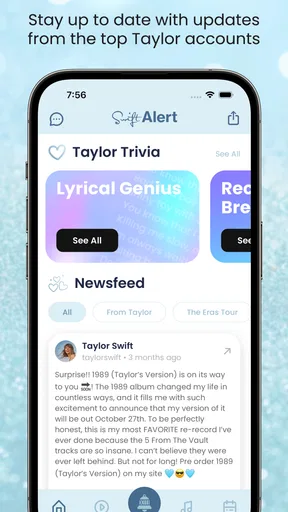
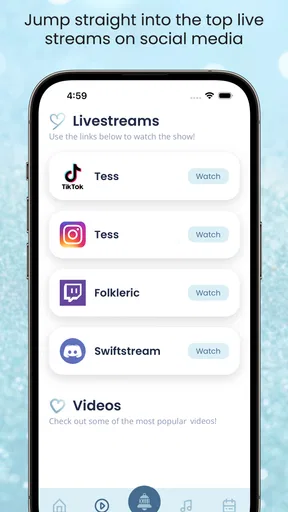
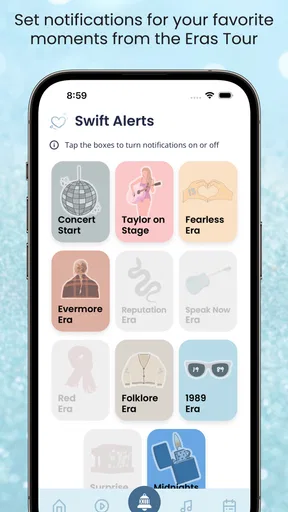
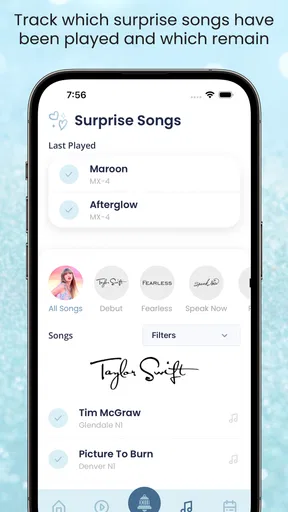
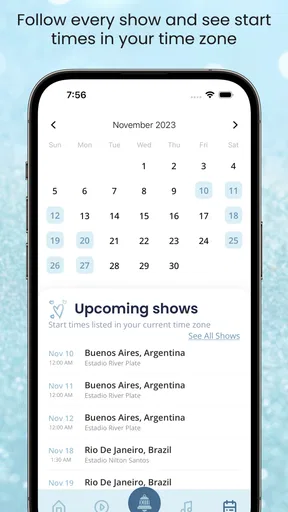
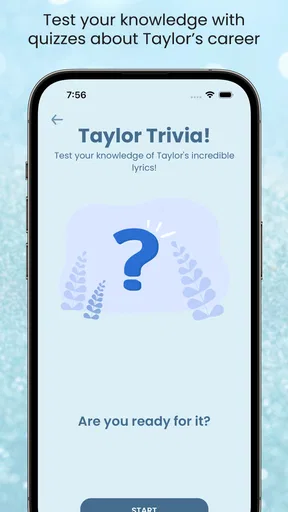
 Analysis by AppCompare
I first thought of Swift Alert as a general safety app, but its actual focus is much narrower: it is an events app built around tour notifications. That distinction matters before you install it. If you follow tour announcements and want those notices on your phone, it may fit neatly into your routine; if you expect crime reports, emergency contacts, or neighborhood-watch tools, it is not the app described by its purpose.
Start with the kind of alert you want
The main question is whether tour updates are useful to you in the first place. Someone who checks an artist’s news only occasionally may be perfectly well served by the artist’s usual social channels or event pages. Swift Alert is more appealing if you would rather have a dedicated place to keep an eye on tour-related news instead of repeatedly checking several sources yourself.
That can be especially handy when you are coordinating with friends. Imagine you are at work while a friend is trying to decide whether a newly announced date is worth traveling for. A tour notification gives you a reason to check the details and talk through the plan, rather than relying on one person to remember to refresh a page. It does not make the decision for you, but it can reduce the chance that you simply miss a notice because you were not looking at the right place.
There is a trade-off: an alert is a prompt to look, not a complete plan. Before you commit to travel or spending, check the event information through the relevant official source. I would treat the app as a way to stay aware, not as a replacement for confirming the date, venue, or purchase details when you are ready to act.
Setup checks that can save frustration
If you install it and do not immediately see something useful, first make sure the app is set up for the tours and artists you actually care about. A notification tool is only helpful when its choices match your interests. It is worth taking a moment during setup to be deliberate rather than selecting broadly and then wondering why your feed or alerts feel noisy.
Also check your phone’s notification settings if you expect a prompt but do not see one. On both Android and iOS, system-level notification controls can affect whether an app is allowed to alert you, and a quiet or focus mode can make an alert less noticeable. Those checks are general troubleshooting steps, not evidence that Swift Alert itself is failing. If you prefer fewer interruptions, keep notifications limited to the updates you would genuinely act on.
Swift Alert is free to download, with optional in-app purchases listed from $0.99 to $19.99 per item. I would start with the free experience and decide whether it fits your routine before spending anything. That is a sensible approach for an app whose value depends heavily on how often you follow tours and how much you want a dedicated notification source.
Worth Reading Before You Choose

EA SPORTS FC Mobile 26 Is a Bigger Football Game, but It Takes Time

Flipboard Shows What News Apps Must Do Beyond the Feed

Switching to Android Auto Means Rethinking Your Driving Routine

Google Calendar Makes a Crowded Week Easier to Manage

Ludo King Makes the Most of the Minutes Between Plans

Baby Panda World Brings Quick Play to Modern Phones, but Its Game Library Feels Busy
Getting Started with Swift Alert
Setting up Swift Alert is a breeze. You just download it from your app store of choice and get going. The user interface is clean and intuitive, which is a big win when you're dealing with something as crucial as safety. The app guides you through a simple onboarding process, making sure you know where everything is before you even need it. And trust me, when it comes to safety, knowing your way around an app can be a real lifesaver.
Features Worth Talking About
The app packs quite a punch with its real-time alerts feature. You can customize the types of alerts you receive, whether they're weather-related, crime reports, or even health advisories. The alerts are timely and reliable, ensuring you're always in the loop.
Another standout feature is the emergency contact system. You can set up a list of contacts to be notified in case of an emergency. The app can send your location and a customized message with just a tap. It’s a reassuring feature, knowing that your loved ones will be alerted if something goes south.
Oh, and let’s not forget the community alert system. It’s like having a neighborhood watch in the palm of your hand. You can receive and even send alerts about suspicious activities around your area. It’s a fantastic way to keep your community safe and in the loop.
Performance and Usability
When it comes to performance, Swift Alert is smooth as butter. I haven’t experienced any lag or crashes, which is crucial for an app that could potentially be used in high-stress situations. The notifications are prompt, and the app doesn’t drain your battery, which is always a bonus.
Usability-wise, the app is designed with the user in mind. The navigation is straightforward, and everything is easily accessible. Whether you’re a tech-savvy individual or someone who’s just getting the hang of smartphones, you’ll find the app easy to use.
Privacy Concerns
In this day and age, privacy is a big deal, and Swift Alert gets it. The app requires permission for location services, which is understandable given its purpose. However, it doesn’t overreach or ask for unnecessary permissions. Plus, the app promises not to share your data with third parties, which is a relief.
Who Should Download It?
If you’re someone who values safety and likes being in the know, Swift Alert is definitely worth considering. It’s great for parents, frequent travelers, or anyone who wants a little extra peace of mind. The app is versatile and caters to a wide range of safety needs, making it a valuable addition to anyone’s app arsenal.
In conclusion, Swift Alert is more than just an app; it’s a tool for empowerment and peace of mind. Whether it’s keeping you informed about potential dangers or ensuring your loved ones are alerted in an emergency, it delivers on its promises. So, if you’re on the lookout for a reliable safety companion, give Swift Alert a shot. You might just find it’s exactly what you’ve been looking for.
When a notification does not appear
If an expected tour notice is missing, I would troubleshoot in a simple order rather than reinstalling straight away. Open the app and confirm that your selections still reflect the artists or tours you want to follow. Then check the device’s notification permission and any focus, quiet, or battery-management settings that might limit background alerts. After that, reopen the app and give it a moment to refresh. These checks cannot guarantee a particular notice will arrive, but they help separate a phone setting issue from an app-selection issue.
It also helps to keep expectations realistic about timing. A notification is useful for drawing your attention to an update, but phones can be offline, muted, or otherwise unavailable when it arrives. If a date is important to your plans, use the alert as a reminder to verify the details rather than treating the notification as the only source you need.
Where it fits among event tools
Compared with checking social feeds manually, a dedicated tour-notification app can make following several artists feel less scattered. Social platforms are useful for broader announcements and conversation, while event pages are better when you are ready to inspect a specific listing. Swift Alert’s clearest role is in between: it can help you notice that something has changed, then you can use the appropriate event source to make a decision.
That division of labor is one of the more practical ways to use it. I would not rely on a single notification channel for an important trip, and I would not install a tour app if I rarely follow live events. But for a fan who follows multiple tours and tends to hear about announcements late, a focused alert source can be more convenient than maintaining a habit of checking every artist’s updates independently.
Who will get the most from it
The app is best suited to people who actively follow tours and value being reminded to look into an announcement. It may also help a group of friends who share concert plans: one person can notice a date, bring it to the group, and everyone can confirm the logistics through their preferred event source. That is a modest benefit, but it is the kind of everyday convenience that can matter when plans depend on catching information early.
On the other hand, I would skip it if you are looking for a broad public-safety service, a ticket-buying platform, or an all-purpose event calendar. The name might suggest a wider alert role, but the app’s stated focus is tour notifications. Matching that expectation before installing will save you time and avoid depending on it for something it is not meant to do.
What the catalog details tell me
Swift Alert is developed by Swift Alert LLC and is free to install. It has an average rating of 4.9 from around 21,000 ratings, with over 100,000 installs, which suggests a substantial audience among people looking for this kind of focused update. Its content rating is Everyone, and the current version is 3.4.2, with a minimum OS requirement of 7.0. Those details make it easy to judge basic compatibility, though your own phone’s settings and your interest in tour news will matter more to the day-to-day experience.
The app was released on August 23, 2023, and has 317 written reviews. I would not treat a high average rating as a promise that every announcement will arrive at exactly the moment you expect; notifications depend on both the app and your device environment. Instead, I see the rating and install count as a useful sign that this is an established option rather than an obscure tool, while still leaving room for personal preference about alerts and event discovery.
My practical verdict
For me, the value of Swift Alert comes down to whether tour news is something I routinely want to catch. If it is, having a dedicated prompt can be easier than remembering to check scattered sources. I would configure it narrowly, keep phone notifications enabled in the way that suits my routine, and verify any event details before making plans. If concerts are an occasional interest, ordinary event pages and social updates may be enough.
Overall, I would recommend it to a friend who follows tours and wants a convenient nudge when there is something worth checking. I would not recommend it as a general safety companion or as a substitute for official event information. Used for its actual purpose, it can make staying aware feel simpler; used with the wrong expectations, its name and alert framing could lead to confusion. That distinction is the most important thing to know before downloading it.
Pros
- Intuitive interface for quick navigation.
- Customizable alerts for various needs.
- Real-time notifications ensure timely updates.
- Supports multiple languages for global users.
- Minimal battery consumption during use.
Cons
- Limited free version features.
- Occasional notification delays reported.
- Requires internet for full functionality.
- Some users face setup complexity.
- No desktop integration available.
FAQs for Swift Alert
What is Swift Alert and how does it work?
Swift Alert is a real-time notification app designed to keep users informed about emergencies or important updates in their area. By utilizing GPS technology, it provides location-based alerts for weather conditions, traffic incidents, and public safety announcements. Users can customize the types of alerts they receive and set specific preferences based on their needs.
Is Swift Alert free to use, or are there any subscription fees?
Swift Alert offers a free version with basic features, allowing users to receive essential alerts. However, for more advanced features such as priority notifications, extended alert history, and customization options, there is a premium subscription available. Pricing details for the premium plan can be found within the app’s store page.
How accurate and reliable are the alerts provided by Swift Alert?
Swift Alert partners with trusted data sources to ensure the accuracy and reliability of its notifications. It uses advanced algorithms to process real-time data, minimizing the chances of false alerts. Users are also encouraged to provide feedback to help improve the service's effectiveness and accuracy over time.
Can Swift Alert be customized for different types of alerts?
Yes, Swift Alert offers extensive customization options. Users can choose the types of alerts they wish to receive, such as weather, traffic, or public safety. Notifications can be further tailored by setting preferences for specific alert levels, ensuring that users are only notified about events that are relevant to them.
What platforms is Swift Alert available on, and how do I download it?
Swift Alert is available for both Android and iOS platforms, making it accessible to a wide range of users. To download, simply visit the Google Play Store or Apple App Store, search for 'Swift Alert,' and follow the installation instructions. Ensure that your device meets the app's compatibility requirements for seamless operation.


